The podcast editing fundamentals you can’t miss
With my good friend Vincent, we’re crafting a podcast on personal finance and investment. As I already had a podcast for a little more than a year now, Vincent asked me a few tips on how to transform our collection of raw tapes into a great audio experience.
Here are the insights I shared with him and hope it will make his first edits easier!
A little note before getting started, audio editing is no magic:️
Editing and post-production can only sublime an already good audio capture. It can make great audio out of good tapes, but you’ll struggle to make anything out of crappy raw tapes.
Bad microphone, extreme background noise, poor recording conditions, are just impossible to totally correct in post-prod. The best you can do when such a situation occurs is to identify & address the problem when you’re capturing your audio, not after.
Prerequisites
- You already have a DAW (Digital Audio Workstation) maybe Adobe Audition, Garage Band, Logic Pro, Audacity, you name it.
In this post we’ll cover:
- The pre-processing steps — some no-brainers for preparing your audio;
- Putting the story together — the details to give attention to when crafting your audio content.
…All of this seasoned with some protips I learned the hard way in my audio content creation journey, let’s dive in!
1 — Audio preprocessing 101
Most DAW comes with hundreds of audio effects, yet you only need a handful of them to greatly improve your audio. Here are my two favorites:
A — Noise Reduction
Your audio has some white noise? Your laptop fan went banana while recording and polluted your track? Most DAW embarks tools to perform noise reduction. Usually, you’ll use a mechanism of capturing a footprint of the noise you want to remove and then apply the noise reduction step.
It’s fairly easy to perform this noise-capture / noise-reduction combo in Audacity.
Why do we do this? Clearing noise becomes difficult as effects pile up on the audio, doing it first ensures you have the maximum chance of minimizing the noise’s impact on your track.
Any limitations? Noise reduction techniques work astonishingly well for white noise but will struggle for more complex noises.
B — Normalization
Normalizing your audio is “re-scaling” its volume to take all the “volume space” available. You want to leave some headroom to avoid clipping if you apply some effects further down the road. Aim for a max volume of -0.5 dB instead of 0dB to have some security.
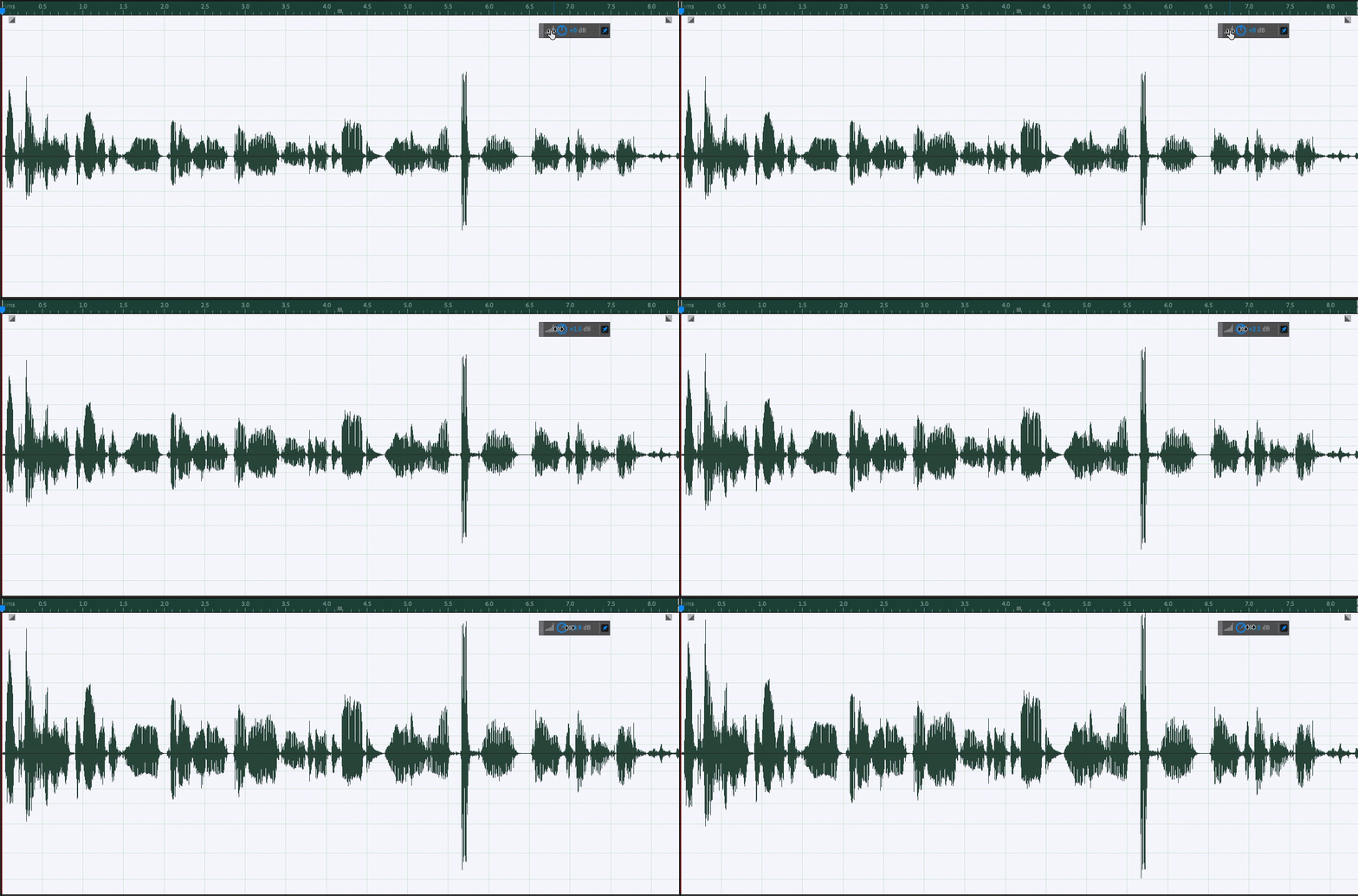
Why do we do this? You’ll have consistent volumes between all your tracks and limit the phenomenon of having someone’s mic being super loud and someone else being super quiet.
And that’s it for the 2 no-brainers effects anyone involved in audio processing should use! If you feel comfortable you can take a look an EQ and compressor plugins as a next step, but in doubt: less is more in audio processing.
2 — Putting the story together
Now that you cleaned your audio and normalized it, which literally takes less than a minute to do once you know how to find the option in your tool, let’s dive into the meaty part of the editing: assembling somewhat chaotic tapes into what feels like a compelling audio story.
A —Editing audio & preserving breath
It’s likely you’ll need to cut some parts of your audio here and there, removing false starts, a big background noise, anything you don’t want in the finished tape. When doing so, aim to keep a natural breathing cycle, i.e., don’t cut a breath in the middle. It sounds unnatural to our ears.
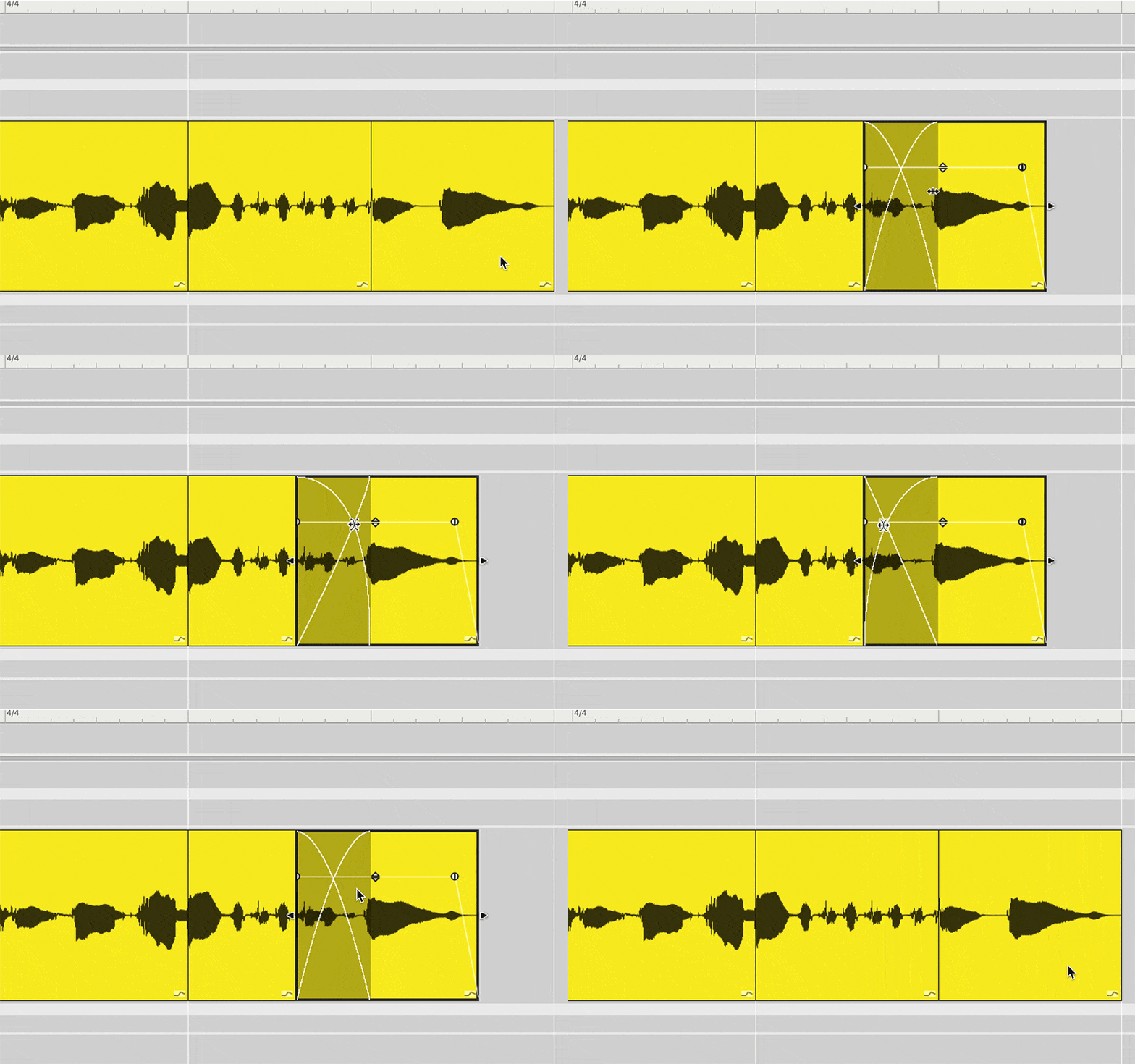
To cut a false start, look at the closest breath before, the closest one after, and use a merge of those two to “glue” your tracks together. The crossfade techniques discussed below will come in handy for this
B — Smooth transitioning with crossfades
When two pieces of audio have mixed levels or are two different tracks, let’s say voice and music, transitioning from one to the other without a progressive context switch sounds odd. You can use a crossfade to make the transition sounds smooth and more natural to the human ear.
Protips
If you add music, I recommend you add it last, once your main vocal editing is done. If you search the internet for “the perfect sound” while in the middle of your edit session, you’ve got a big chance of losing your editing flow. I prefer to take a note while I’m editing, most DAW offer the possibility to add markers in your tracks, you can use one like “Add light joyful transition jingle of 5~10s here” and come back to the actual jingle selection later.
Wrapping it up
Audio editing is a skill requiring practice, your first episodes might take some time to reach the desired result, but progressively your ear will improve its capacity to identify whether a transition is smooth, whether a breath is natural, and this combined with a step-by-step mastery of your tool will dramatically improve the quality of your audio content creation.
For additional protips on podcast editing, you can also check my other article.
References
- Brian Miller Audio 101 YouTube channel is a fantastic resource for audio content creation. From mic reviews, to how to adjust your EQ settings, this channel run by a full-time audio expert covers the whole spectrum around audio., https://www.youtube.com/c/AudioforContentCreators
- The Gimlet Academy, a podcast on how to make a podcast, available on Spotify, is an inspiring podcast to listen to and re-listen as needed to understand how to craft compelling audio stories., https://open.spotify.com/show/7hhEbl4DOMheWRunCUAla6.
- A great resource for sound matching themes is Epidemic Sound (referral link), they propose a catalog of sounds and music that you can use for your podcast with the appropriate copyright. Their recommendation engine is insanely good at proposing you the right sound for your podcast. You can search by mood (happy, joyful, suspense, etc) or by category (science, tech, etc). It’s now my go-to service for creating a consistent sound atmosphere in my shows., https://www.epidemicsound.com/.
- Cover photo by Rezli on Unsplash.